완성된 유니티 기반 2D 클리커 게임 프로젝트 분석 및 강의 수강 후 새롭게 알게 된 내용 또는 추후 프로젝트에 적용해보고 싶은 내용들을 정리했습니다. 정리된 것 이외에도 유용한 내용들이 많은 알찬 강의이니 실제 출시되는 게임의 프로젝트 구조나 코드를 알고 싶은 분들께 추천드립니다. 코드는 중심 내용을 보여줄 수 있도록 일부만 발췌하였습니다.
Preview
- 중앙 집중식 매니저 관리
- 메서드 래핑(Method Wrapping)
- 확장 메서드(Extension Method)
- UI 중심 설계
- Prefab 동적 생성
- 코드 기반 이벤트 바인딩
- 인트로 컷씬 생성
- 광고 추가
본 게시물은 Rookiss, [실전 게임 코드 리뷰] 유니티 클리커 게임, 인프런, 2022 를 학습하고 작성되었습니다.
중앙 집중식 매니저 관리
Managers 클래스에서 다른 매니저를 한번에 모아서 관리
public class Managers : MonoBehaviour
{
    public static Managers s_instance = null;
    public static Managers Instance { get { return s_instance; } }

    private static ResourceManager s_resourceManager = new ResourceManager();
    private static DataManager s_dataManager = new DataManager();

    public static ResourceManager Resource { get { Init(); return s_resourceManager; } }
    public static DataManager Data { get { Init(); return s_dataManager; } }

    private void Start()
    {
        Init();
    }

    private static void Init()
    {
        if (s_instance == null)
        {
            GameObject go = GameObject.Find("@Managers");
            if (go == null)
                go = new GameObject { name = "@Managers" };

            s_instance = Utils.GetOrAddComponent<Managers>(go);
            DontDestroyOnLoad(go);

            s_dataManager.Init();
            s_resourceManager.Init();
        }
    }
}
public class DataManager
{
public void Init()
{
Start = LoadSingleXml<StartData>("StartData");
...
}
}- static 프로퍼티로 각 매니저 클래스의 접근성 높임
- 매니저 클래스 간의 결합도 낮춤
- Monobehavior를 상속하지 않으며 생명 주기 함수(Awake, Enable, Start)로 인한 예상치 못한 오류 예방
매서드 래핑(Method Wrapping)
    public void Destroy(GameObject go)
    {
        if (go == null)
            return;

        Object.Destroy(go);
    }
오브젝트를 삭제하는 경우 Unity에서 기본 제공하는 Destroy를 바로 사용해도 되지만, 한번 래핑해 사용
- 모든 오브젝트 삭제 로직의 중앙 관리
- 삭제 로직에 추가 또는 삭제해야 하는 내용 있을 경우 수정이 간편해짐 (ex. 삭제되는 오브젝트 로깅, 삭제되는 오브젝트 null check 등)
확장 메서드(Extension Method)
public static class Extension
{
    public static T GetOrAddComponent<T>(this GameObject go) where T : UnityEngine.Component
    {
        return Utils.GetOrAddComponent<T>(go);
    }

    public static void BindEvent(this GameObject go, Action action, Define.UIEvent type = Define.UIEvent.Click)
    {
        UI_Base.BindEvent(go, action, type);
    }
}
자주 사용되는 메서드 확장 메서드로 정의
// 확장 메서드 사용 전
Utils.GetOrAddComponent<Button>(gameObject);
UI_Base.BindEvent(gameObject, OnClick);

// 확장 메서드 사용 후
gameObject.GetOrAddComponent<Button>();
gameObject.BindEvent(OnClick);
코드 가독성 향상
// 여러 작업을 연속으로 수행
gameObject
    .GetOrAddComponent<Button>()
    .BindEvent(OnClick);
메서드 체이닝 가능
UI 중심 설계
2D Sprite 대신 모든 게임 오브젝트를 UI로 구성
- UI 시스템의 이벤트 처리 용이
- Canvas 기반의 일관된 렌더링
- UI 이벤트 시스템과의 완벽한 통합
Prefab 동적 생성
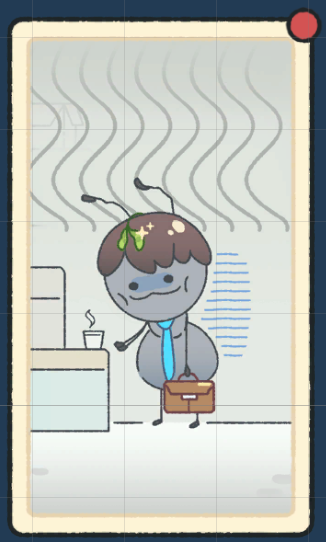
Popup UI 뿐만아니라 그 내부에 반복되는 UI 요소 또한 하나의 Prefab으로 묶어 Popup UI를 생성할 때 subitem으로 생성하도록 구조 설계

public T MakeSubItem<T>(Transform parent = null, string name = null) where T : UI_Base
{
    if (string.IsNullOrEmpty(name))
        name = typeof(T).Name;

    GameObject prefab = Managers.Resource.Load<GameObject>($"Prefabs/UI/SubItem/{name}");
    GameObject go = Managers.Resource.Instantiate(prefab);

    if (parent != null)
        go.transform.SetParent(parent);

    go.transform.localScale = Vector3.one;
    go.transform.localPosition = prefab.transform.position;

    return Utils.GetOrAddComponent<T>(go);
}- 반복되는 UI 구조를 Prefab으로 정리
- 동적 생성으로 메모리 효율성 향상
- 코드로 구조를 파악하기 쉬움
- 재사용성과 유지보수성 증대
코드 기반 이벤트 바인딩
UI에 이벤트를 연결할 때 Inspector view에서 연결하지 않고 코드로 연결
public static void BindEvent(GameObject go, Action action, Define.UIEvent type = Define.UIEvent.Click)
{
    UI_EventHandler evt = Utils.GetOrAddComponent<UI_EventHandler>(go);

    switch (type)
    {
        case Define.UIEvent.Click:
            evt.OnClickHandler -= action;
            evt.OnClickHandler += action;
            break;
        // ... 다른 이벤트 타입들
    }
}- 협업 시 Git 충돌 최소화 (Inspector 설정 대신 코드로 관리)
- 동일한 Prefab을 여러 개발자가 수정할 필요 없음
- 이벤트 연결 로직이 코드에 명시적으로 표현됨
인트로 컷씬 생성
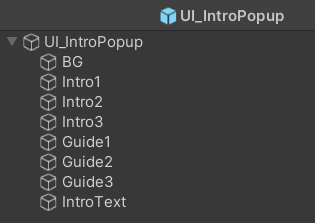
public class UI_IntroPopup : UI_Popup
{
    public enum GameObjects
    {
        Intro1,
        Intro2,
        Intro3,
        Guide1,
        Guide2,
        Guide3
    }

    Action _onEndCallback;
    int _selectedIndex;
    int _startIndex = (int)GameObjects.Intro1;
    int _lastIndex = (int)GameObjects.Guide3;

    void OnClickImage()
    {
        // 끝났으면 닫는다
        if (_selectedIndex == (int)GameObjects.Guide3)
        {
            Managers.UI.ClosePopupUI(this);
            _onEndCallback?.Invoke();
            return;
        }

        // 다음 것으로 이동
        _selectedIndex++;
        RefreshUI();
    }
}- 각 컷씬을 개별 UI Image로 구현
- 클릭으로 활성/비활성화 전환
- 단일 팝업 오브젝트로 모든 컷씬 관리
- 콜백을 통한 완료 이벤트 처리
광고 추가
추후 작성 예정