2D Sprite 4방향 전환 애니메이션 적용하며 NavMeshAgent를 이용하려면 steeringTarget을 사용해야한다.
방향 전환을 시도해본 방법으로는
1. nextPosition
2. FindClosestEdge
3. steeringTarget
이 있는데 이중 steeringTarget만 정상 작동한다.
nextPosition은 바로 다음 위치를 가져오므로 디버깅했을 때 현재 위치와 거의 차이나지 않아 방향 전환에 부적합했다.
FindClosestEdge가 움직임이 자연스럽다고 하여 활용해보려했으나 2D에는 잘 적용되지 않는 것 같았다.
steeringTarget은 경로상의 다음 목적지를 가져오며 자연스러운 방향전환을 보여주었다.
    private void Update()
    {
        StateMachine.CurrentHumanState?.Update();   // 상태 머신에서 현재 상태를 계속 갱신
        if (TargetMonster != null)  // 타겟 몬스터가 있으면
        {
            AnimationDirectionChange(TargetMonster.position);   // 몬스터 방향으로 회전
        }
        else    // 타겟 몬스터가 없으면
        {
            AnimationDirectionChange(Agent.steeringTarget); // 다음 목적지 방향으로 회전
        }
    }

    // 목표 지점 기준으로 애니메이션의 방향 전환하는 메서드
    private void AnimationDirectionChange(Vector3 targetPosition)
    {
        Vector2 direction = ((Vector2)targetPosition - (Vector2)transform.position).normalized;
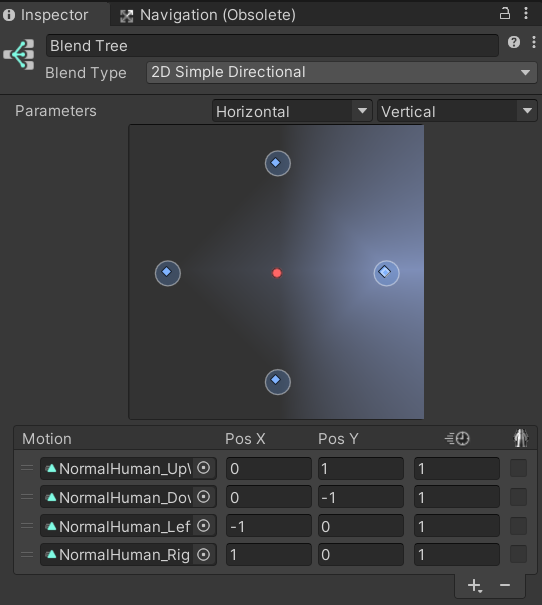
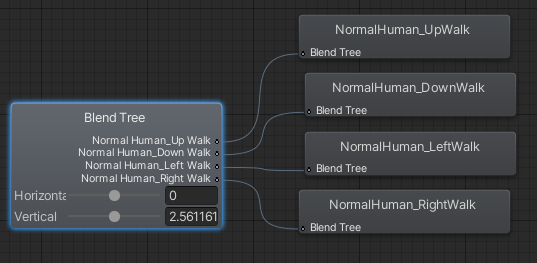
        animator.SetFloat("Horizontal", direction.x);
        animator.SetFloat("Vertical", direction.y);
    }
애니메이션의 방향 전환은 Blend Tree를 이용한다.
참고자료:
https://docs.unity3d.com/kr/2022.3/ScriptReference/AI.NavMeshAgent.html
'내일배움캠프 > TIL' 카테고리의 다른 글
| [내배캠][Unity6기][TIL] Scene Reload 버그 트러블슈팅 (0) | 2024.12.13 |
|---|---|
| [내배캠][Unity6기][TIL] Find 계열 함수 호출 빈도 줄이기 (0) | 2024.12.12 |
| [내배캠][Unity6기][TIL] NavMesh 트러블슈팅 (0) | 2024.12.09 |
| [내배캠][Unity6기][TIL] NavMesh 경로 설정 수정 (0) | 2024.12.06 |
| [내배캠][Unity6기][TIL] 최종 프로젝트 중간 기록 (1) (0) | 2024.12.05 |